Reminders, the weekly summary and quiet hours
Reminders are set on each phone, for that phone only. Everyone in the home picks their own.
Open Household → Reminders. You can also search for “reminders” with the magnifier at the top.
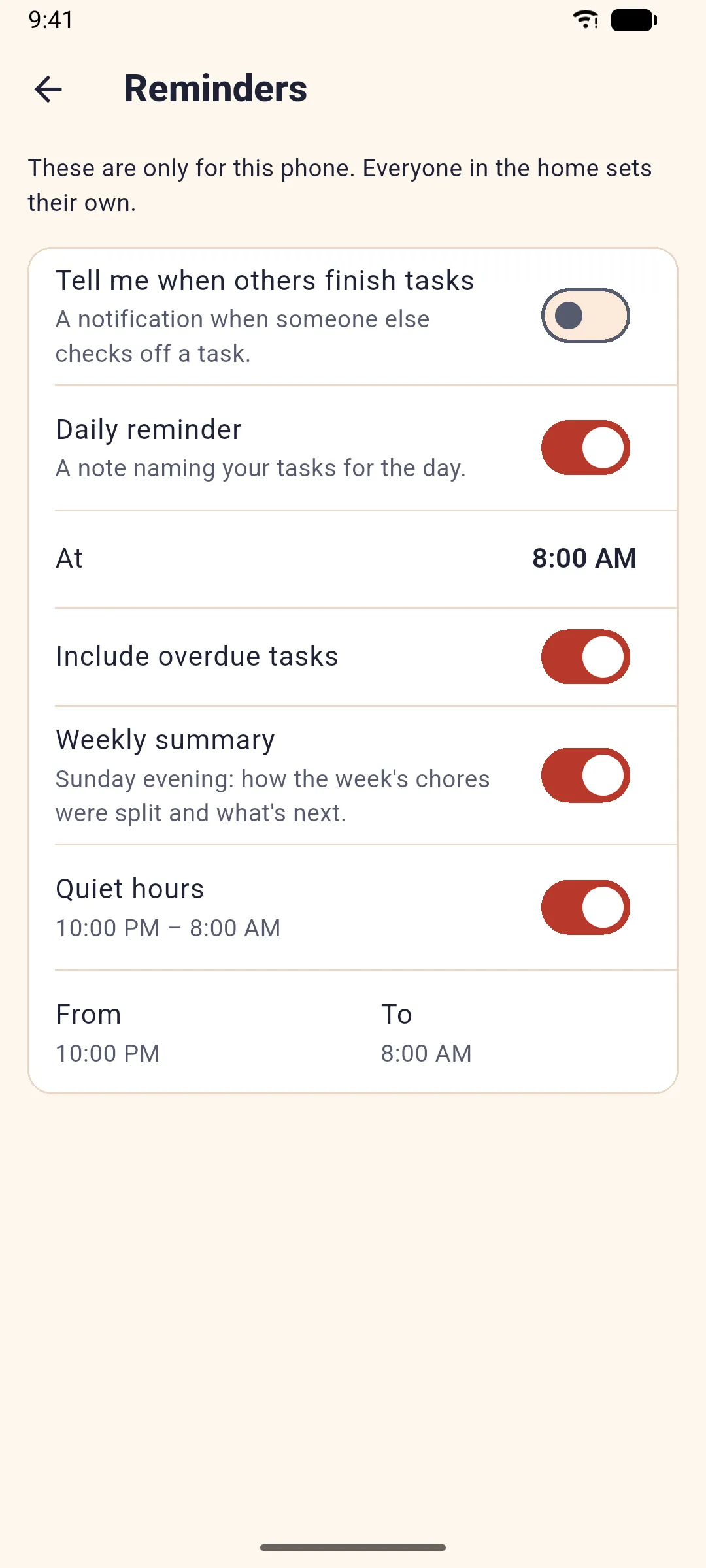
Daily reminder
Turn on Daily reminder and pick the time under At. Once a day you get a note that names your chores for the day, like “3 tasks today”. Turn on Include overdue tasks if you also want the ones you missed.
Weekly summary
On Sunday evening, Weekly summary shows how the week’s chores were split, how many points you did, and what’s coming for you next week. It’s on by default; turn it off here.
When others finish a chore
In a shared home, Tell me when others finish tasks sends a quiet notification like “Ben finished Take out the trash”. It’s off unless you turn it on.
Quiet hours
Turn on Quiet hours and pick From and To. Evenchores sends nothing in that time.
Not getting anything?
If the app says Notifications are off for Evenchores, turn them on in the phone’s settings: Settings → Apps → Evenchores → Notifications. Battery savers can also delay notifications; leaving Evenchores unrestricted helps.
Related: Share your home and invite people.